
› Forums › General Discussion › JPEG or NEF format?
- This topic has 8 replies, 5 voices, and was last updated 1 month, 1 week ago by
Mr Giovanni Di Giovanni.
-
AuthorPosts
-
22 September 2026 at 10:45 am #643024
Mr Giovanni Di Giovanni
ParticipantGood morning everyone,
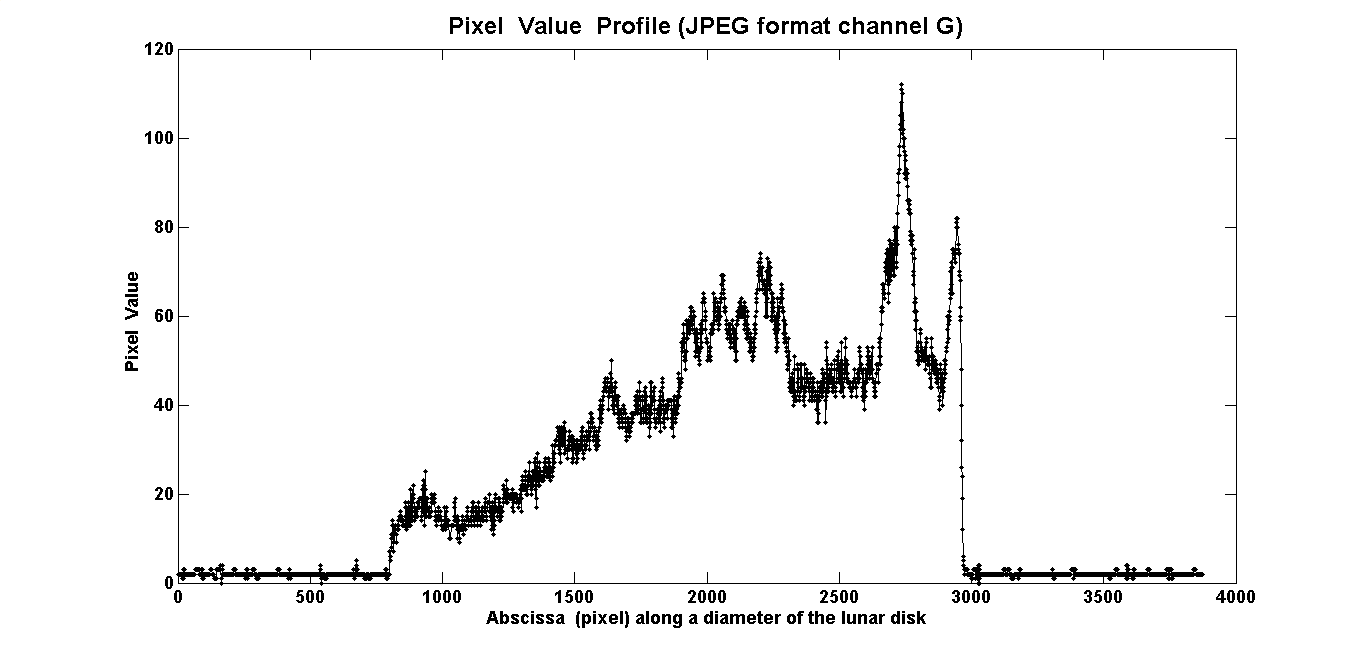
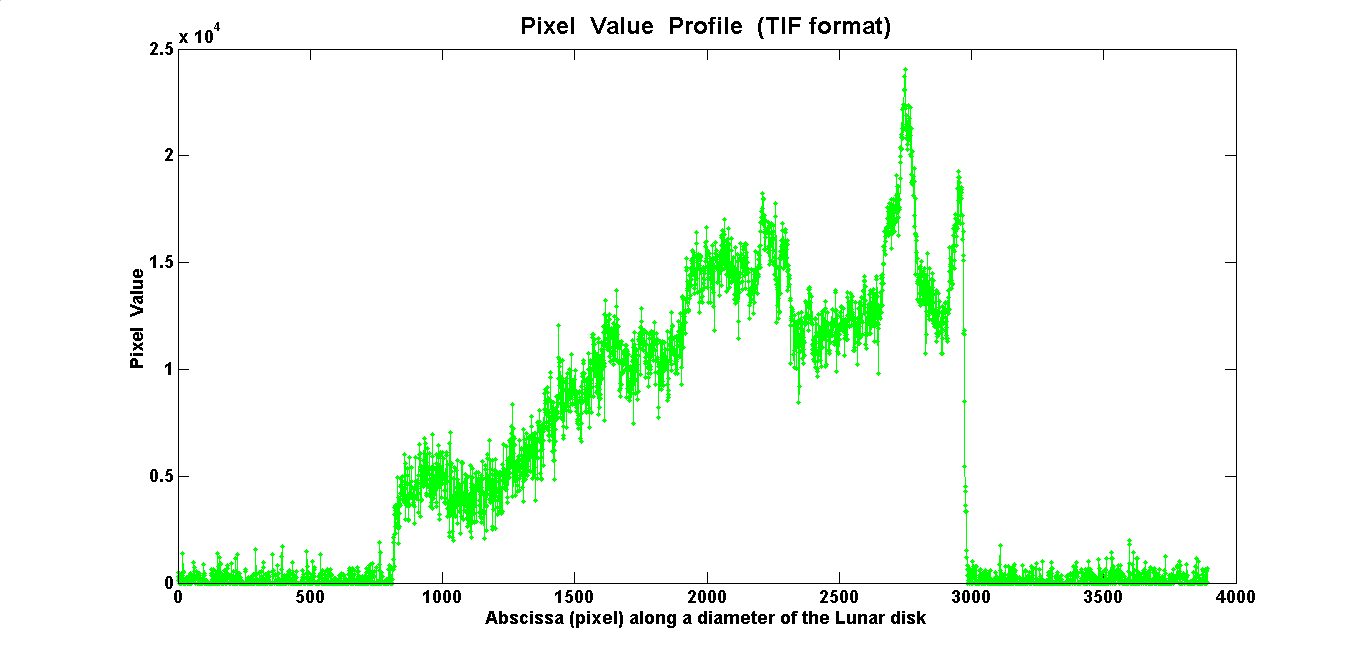
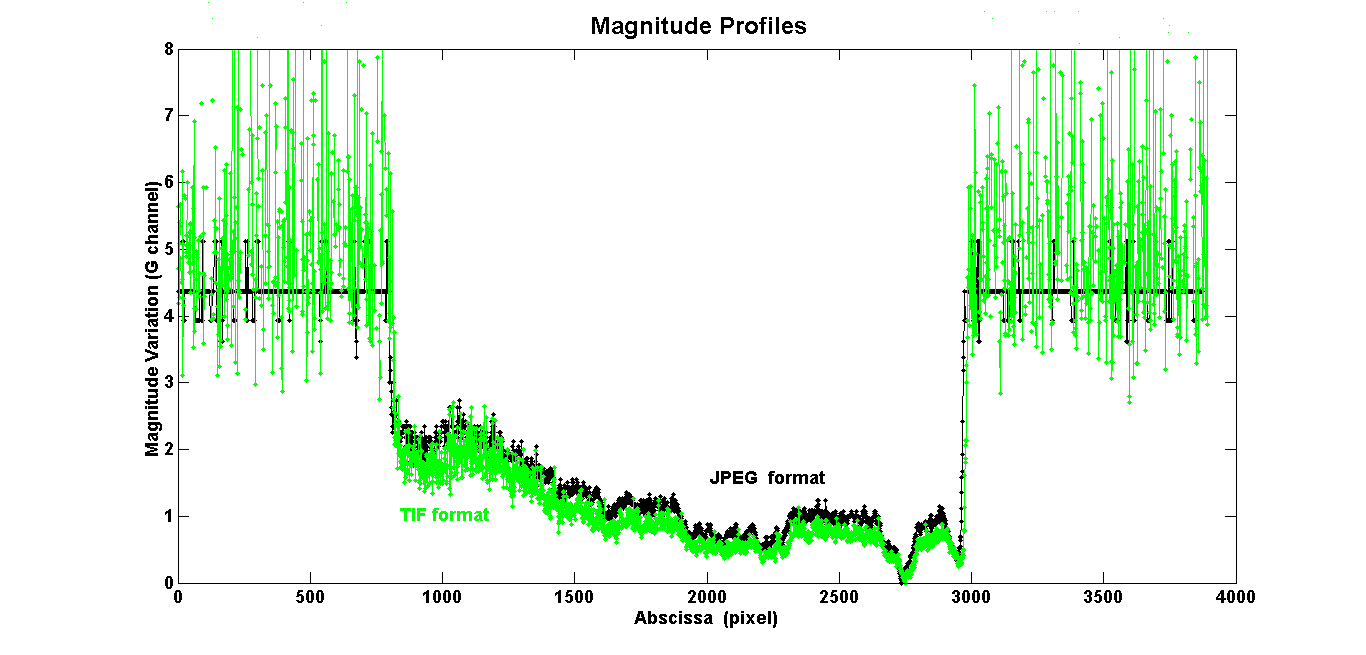
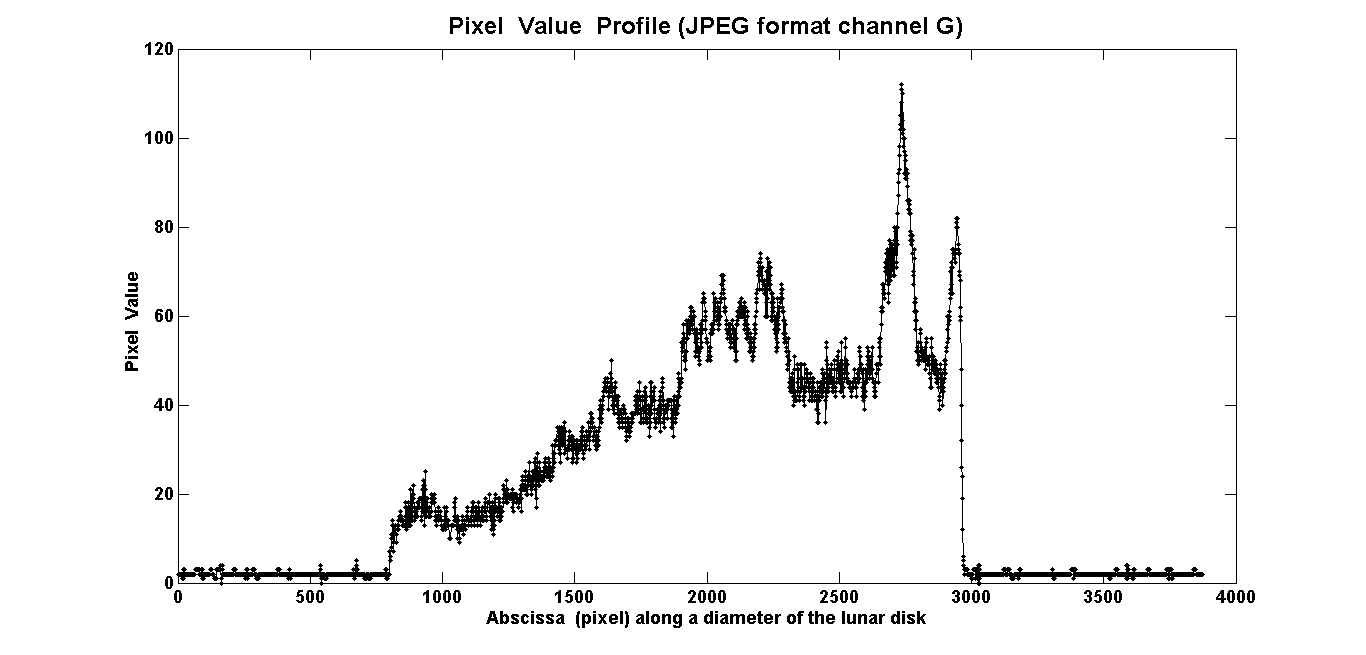
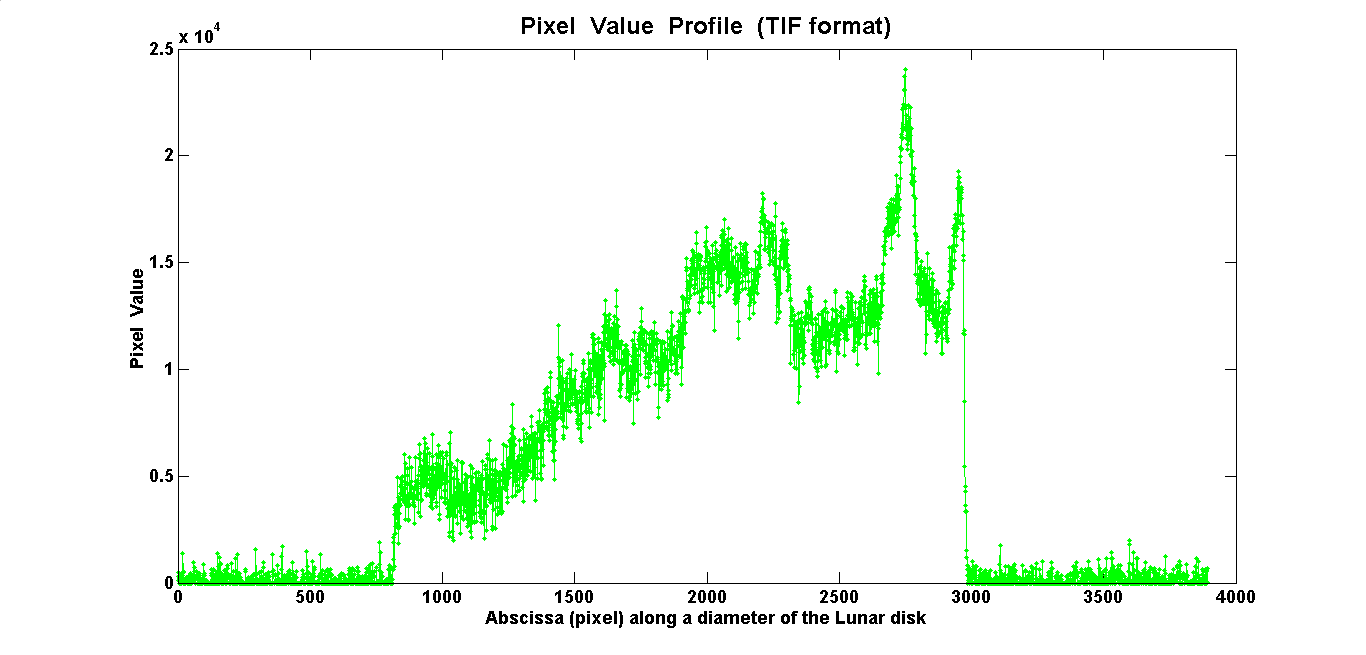
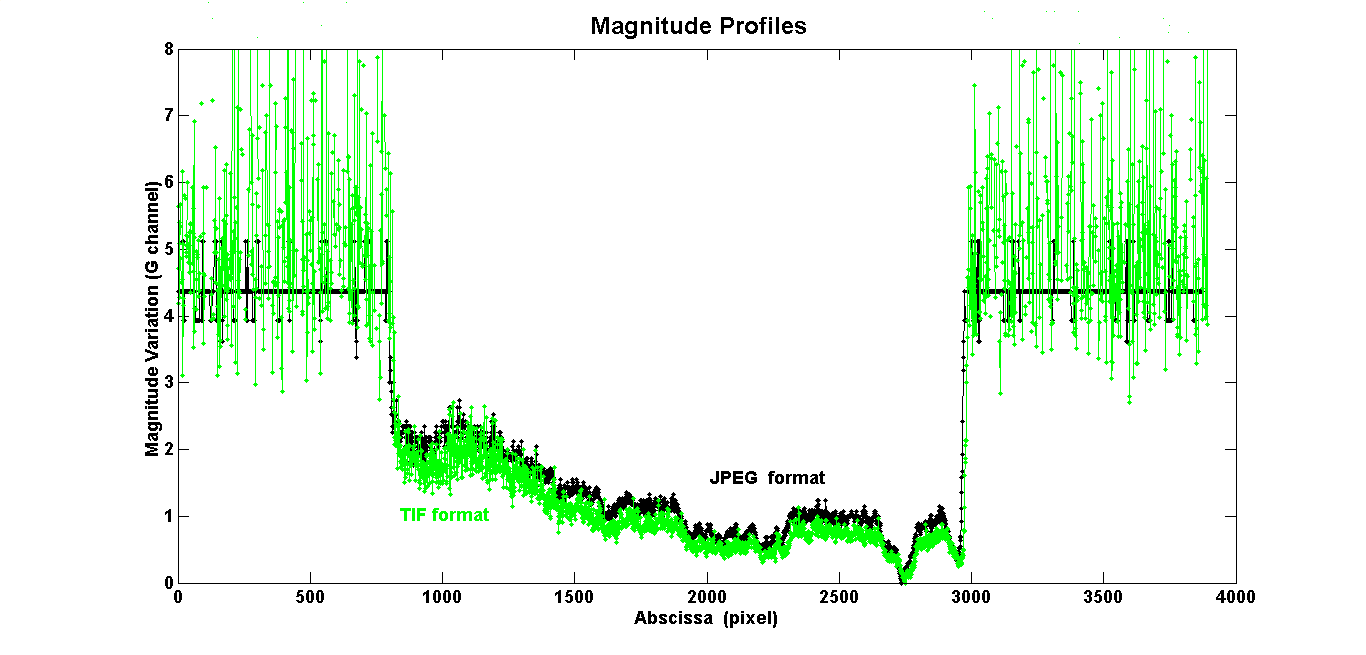
I would kindly ask you to clarify a doubt I have after performing the following test: 1- I simultaneously captured two frames of the lunar disk, in JPEG and NEF format (Nikon RAW); 2- I converted the NEF to TIF (using the RAW-Therapee software); 3- In MATLAB, I separated the RGB&B channels of both frames; 4- I read the Pixel Values of the same row on each frame (JPEG and TIF) and constructed the two attached diagrams; 5- I calculated the magnitude variations (Pogson’s formula) along each profile and compared them (attached).
The PV profiles appear different both in terms of dispersion and the numerical values of the PVs themselves. However, their shape and general trend are very similar. Furthermore, the magnitude variations of each lunar point compared to a reference point (maximum PV) are almost equal. Finally, each graph (from TIF format) shows the enormous dispersion of the experimental values. This is not the case for the JPEG format.
All this would suggest that JPEG and NEF (or RAW) shots are approximately equivalent, and indeed it doesn’t seem entirely convenient to shoot in RAW to avoid taking up too much memory.
NOTE: a) The frames were taken from the island of Elba during the eclipse of May 16, 2022; b) my MATLAB version (R12) doesn’t read the RAW format.
I confess to being quite ignorant about computer science and CCD photometry. Could someone please consider what I’ve explained and help me understand better?
Thank you and best regards.
JPEG or NEF format?-
This topic was modified 1 month, 1 week ago by
-
This topic was modified 1 month, 1 week ago by
-
This topic was modified 1 month, 1 week ago by
22 September 2026 at 7:08 pm #643036 Dr Paul LeylandParticipant
I am not really competent to comment on the majority of your material above.
What I would advocate, however, is that you use RAW exclusively if you wish to produce high quality photometry which is compatible with that produced by others. JPEG, TIF, PNG, et al. can do very weird things to the data over and above what the camera itself may do in the area of noise reduction, white balancing and so on.
You likely know all this; I make it clear for the benefit of those readers who may not have come across this concern.
What is the source of your “to avoid taking up too much memory” concern? Not disk space, surely, as multi-terabyte hard disks are dirt cheap these days. Let’s be generous and say a single image uses 100MB. That means a single terabyte will hold ten thousand images. How many images do you take each year?
Paul
22 September 2026 at 8:45 pm #643037ParticipantDr. Paul, it’s certainly not exactly disk space that’s troubling me. I was too incomplete in what I said. More specifically, I have a version of MATLAB that doesn’t accept RAW format frames. Therefore, I have no way of processing in that format; I easily process (i.e., perform photometry) on JPEGs. Since I read everywhere that JPEGs aren’t suitable, that JPEGs compress images (I don’t know exactly what and how), etc., I tried to compare a numerical calculation from JPEGs with one from TIFs that MATLAB reads. I’m surprised that the results are very similar and, above all, that the noise from the simple JPEG format appears much lower than from TIFs (obtained by transforming the NEF).
I’d appreciate any further information.
Thank22 September 2026 at 10:49 pm #643038 Steve BrownParticipant
I’m not particularly qualified to comment on the science or technical aspect of the original post but I would say that for some the size of image files could be a factor. Personally, I don’t take a lot of RAW images as a lot of my photography is of meteors, noctilucent clouds and night sky time lapses. As such, memory space is very much a concern. For example, I’ve taken well over 30,000 images since July.
23 September 2026 at 6:40 pm #643043Dr Paul LeylandParticipantI’m not particularly qualified to comment on the science or technical aspect of the original post but I would say that for some the size of image files could be a factor. Personally, I don’t take a lot of RAW images as a lot of my photography is of meteors, noctilucent clouds and night sky time lapses. As such, memory space is very much a concern. For example, I’ve taken well over 30,000 images since July.
Ah, but you are not doing high accuracy photometry with your images.
External USB 8TB drives appear to be £250-300 these days. You don’t say how big your images are but 100MB each is a generous estimate as far as I can tell. That could get quite expensive if you need to buy three disks per annum, enough to hold 240K or so images.
My images are rather smaller, in the range 2-20M, and I don’t take anywhere the number you do. That said, the SeeStar can churn them out at a helluva rate but those are at least relatively small at just under 4M per FITS format sub. At the standard exposure time of 10s, an hour is 360*4 = 1.44G and a total exposure time of around 5600 hours (circa 230 days) can be stored on a 8TB disk. Given the weather we have and the fact that it is dark for less than 50% of the time, such a disk would last me well over a year and likely several.
Horses for courses.
Paul
23 September 2026 at 9:46 pm #643044 Grant PrivettParticipant
The major difference between a JPG and a TIFF is that a normal JPG will only ever have 8 bit data, while a TIFF can contain 8, 16, 48 or even 96 bit data, depending on how the RGB bands are handled. So, TIFF data can allow a higher resolution measurement than a JPG, which also means a greater dynamic range of values can be represented.
Another difference is that the JPG image created by the Nikon will have been heavily filtered by the Digic. I have no idea exactly what Nikon* do, but presumably artefact suppresion with a large side order of spatial filtering feature in the dark parts of the frame. The joy of using the TIFF data is that you get to control what you permit Matlab to do to your RAW data. Certainly the JPG/RAW profiles showed signs of the background in JPGs being very harhly denoised and that might hide subtle detail
You don’t say if you have applied dark subtraction to your RAW image. If not, that would probably suppress the noise in the RAW frame a little.
As to what JPGing does: if the image compression is overdone, it can create faint square box features in some parts of the image. However, Nikon** will almost certainly apply it well enough that the squares will not be obvious in the JPG without a hefty contrast stretch, but they can – potentially – impact your photometry slightly.
For me, if I wanted to derive meaningful numbers from a dataset, I would always use the dark subtracted RAW files – but JPGs may be useful for sorting out what you want to do to the data.
Hope some of this helps. 🙂
*Or for that matter what Canon do. Both companies are reticent on the subject.
**My camera is a Canon.24 September 2026 at 10:56 pm #643057David C Rayment
ParticipantI do not have sufficient knowledge to comment on the specifics of your enquiry but the following may help:
As Grant says, JPEG files are saved as 8-bit, so 2 to the power of 8. This basically means each R, G and B channel has 256 colour tone gradations. Combined, that’s over 16 million theoretically available. When you save a JPEG file you lose a certain amount of the originally captured data. Save, say, three times, and three different sets of data are lost, so further degrading the original image.
Raw files, on the other hand, exceed 8 bits. A 16-bit Raw file will give you 2 to the power of 16, so 65,536, for each R, G and B channel. Every device used, however, camera or computer screen, will be limited to what gradations it can actually display. Once processed the RAW files may be saved as 8-bit TIFF files which are lossless, or may be compressed to 8-bit LZW TIFF files for archiving. The LZW TIFF files may be reopened without loss of image quality. Always process in 16-bit first and then save to 8-bit.
For general photography I shoot JPEG Fine(L) and Raw together, and use the Adobe RGB colour profile, rather than sRGB, which would only really be used for JPEGs on screen or for posting on the internet. The JPEGs offer a quick check of the image and are often OK with little processing for editorial purposes. Occasionally, however, detail needs to be brought out of the shadows and for this I would use RAW. An example would be if you were to take an under exposed photograph of the moon and naked eye planets shortly after sunset, and you wanted to bring out some background details (e.g. trees), you are likely to find banding in a clear sky when processing a JPEG. With Raw you have more leeway allowing you to push the processing a little further. Processing, however, should always be kept to a minimum by trying to get everything as correct as possible in camera.
Nikon, incidentally, does its own RAW processing software which is freely downloadable from their website. If it is compatible with your camera you may want to experiment with that. You can convert to TIFF.
Another point which may be of interest is the exposure triangle: aperture, shutter speed and ISO. While it is true to say the three work together, it is only the aperture and shutter speed which lets in the amount of light whereas the ISO is the sensor sensitivity. I do not know which ISO you were using to photograph the moon. It is usually best to use the lowest you can, but some camera sensors have a S/N gain at a level higher than the base. For example, if I use my camera to shoot at 400 and need that little extra, I will go to 640 instead of 500 because that is where the S/N gain is. The S/N gain on your camera may be different. Beyond 640 the noise level again increases which may require more image processing.
Do have a look at your images on screen using the sRGB and Adobe RGB colour profile to see if that makes a difference to what you are trying to achieve.
Finally, a gentle reminder to always experiment with your less important images.
25 September 2026 at 8:12 am #643058ParticipantDear fellow amateur astronomers, I take your observations very seriously, and for this reason I carefully read everything you’ve written in your comments: highlighting details in underexposed shots; the importance of the exposure triangle; sRGB and RGB profiles; dark frame subtraction; noise reduction in JPEGs and RAW files.
After this, I feel a proper study of the topics is necessary, and a good book that covers them with a certain rigor.
Thank you.
(P.S. It’s true that “you never stop learning.”) -
This topic was modified 1 month, 1 week ago by
-
AuthorPosts
- You must be logged in to reply to this topic.