
› Forums › Telescopes › NINA Dome-following question.
- This topic has 5 replies, 4 voices, and was last updated 10 months ago by
 Tim Haymes.
-
AuthorPosts
-
3 December 2025 at 3:36 pm #632321
 Tim HaymesParticipant
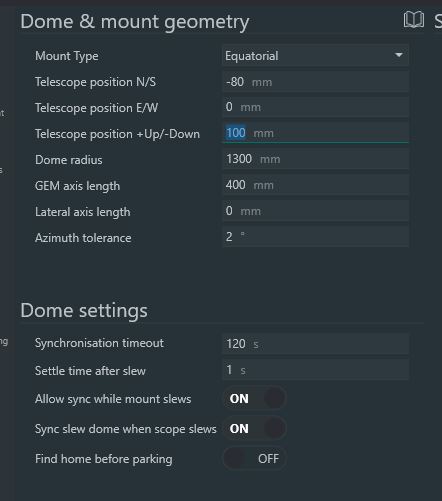
I have grasped the nettle of “dome automation” I have a 2.7m Pulsar and EQ8 mount inside. I have installed the Pulsar ASCOM driver. All good so far except ASCOM platform is V6, not V7 (hopefully no matter). I have configured the dome, and NINA keys can move the dome. The question arises from an on-screen indicator that says:
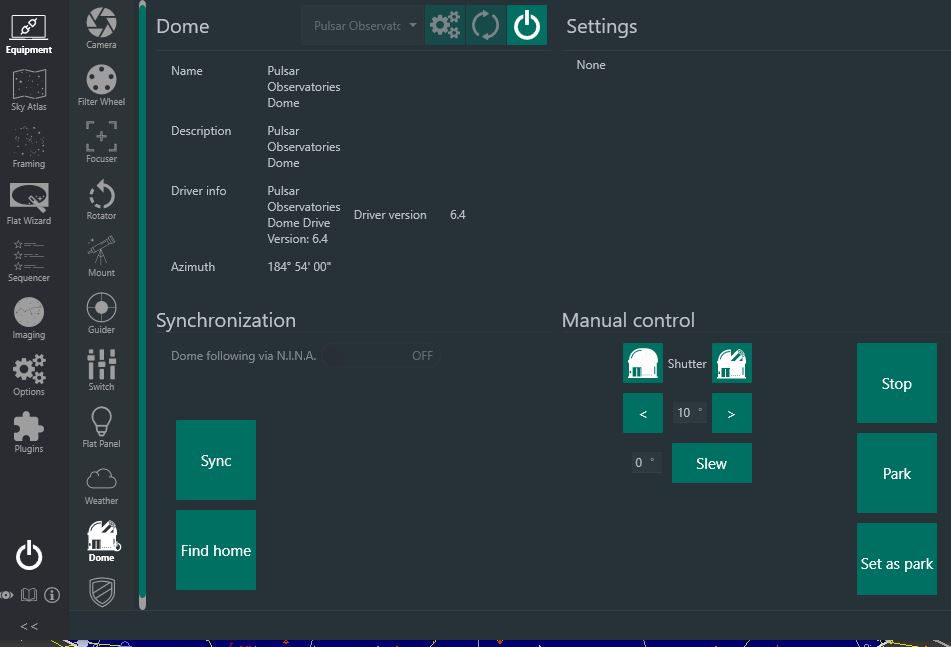
Dome following via NINA is OFF.
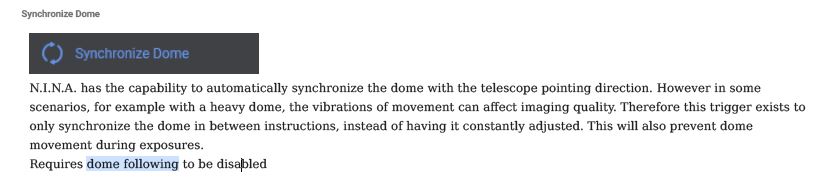
The manual doesn’t explain how to switch it on. A simple answer i hope. There are three images attached.
Tim
(Oxfordshire)Attachments:
5 December 2025 at 10:38 pm #632478 Grant PrivettParticipant
Tim,
I know nothing about NINA but wondered what the problem is with updating ASCOM to v7.1?
Grant
6 December 2025 at 12:45 am #632480William Bristow
ParticipantI’ll have another attempt at answering, for some reason my replies to this and other topics in recent months just disappear after pressing the submit button.
Tim,
The ‘Dome Following’ button is only active when both the Mount and the Dome are simultaneously connected in N.I.N.A and you have correctly configured the dome and telescope/mount geometry in N.I.N.A’s Options > Dome tab.
Depending on the U.I. colour scheme the ‘Dome Following’ button changes from a dark shade of grey to a lighter shade of grey when the mount and dome are both connected, it’s easier to see when the U.I. Light display mode is selected, you just click the ‘OFF’ button and it will change it’s wording to show ‘ON’.
If you haven’t yet configured, or have misconfigured the dome and mount/telescope options, then an error notification will appear when you click the ‘Dome Following’ button and the dome will be automatically disconnected in N.I.N.A.
William.
6 December 2025 at 9:04 pm #632483Tim HaymesParticipantHi Grant. I wanted not avoid making a lot of changes. The next step would be to go up the ASCOM 7
I have v6 on two W10 machines, one is in general use that i use as a test base, the other is the one i use in the OBS.
I will update one at a time.NB I see William Bristow has replied, but i don’t his message. The system has only logged one reply from Grant.
Tim
7 December 2025 at 12:00 pm #632497 Callum PotterKeymaster
Williams reply is now shown above.
10 December 2025 at 2:41 pm #632676Tim HaymesParticipantHi William. I was pleased to read your helpful comments. Thanks.
One of my follow up remarks on progress was also lost. The dome connected fine with the Pulsar ASCOM Driver and i could use the buttons to move the dome, but EQMOD would not connect to NINA, although it was connected with SkyMapPro and SharpCap. Thus the telescope and Dome were not talking.Im pleased to report a solution:
At a recent meeting of my local AS: Abingdon, a software engineer suggested it was likely down to “permissions”. Both SharpCap and SkyMapPro were run as Administrator (on my system), NINA was not. Ive now corrected this and hey-presto! the dome can now follow the telescope.Im still in ASCOM 6 but NINA warns.
-
AuthorPosts
- You must be logged in to reply to this topic.